Core Web Vitals: you pass on desktop and fail on mobile


TL;DR
- Most sites pass Core Web Vitals on desktop and fail on mobile, and mobile is what Google measures.
- LCP < 2.5s, INP < 200ms, CLS < 0.1 are the 'good' thresholds.
- Measured in the lab (PageSpeed Insights) and in the field (Search Console).
- Not a magic factor, but they count and affect conversion.
The three Core Web Vitals
- 1LCP loading
- 2INP interactivity
- 3CLS stability
Page experience that counts
Most sites pass Core Web Vitals on desktop and fail them on mobile. Mobile is what Google measures. They're three metrics for the real experience of a page: loading, responsiveness, visual stability. They don't win rankings on their own, but a slow or jumpy page loses users before the content gets a chance.
The three metrics
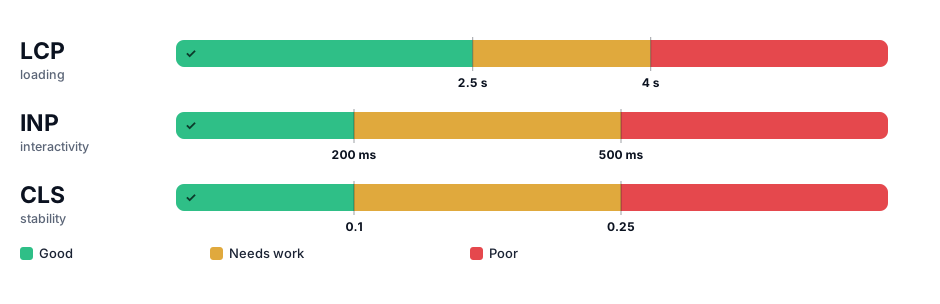
| Metric | Measures | Good |
|---|---|---|
| LCP | Time for the largest element to load | < 2.5s |
| INP | Response to user interaction | < 200ms |
| CLS | Visual stability (layout shifts) | < 0.1 |
How to improve each, concretely
LCP (loading). The largest element is usually your hero image or headline. Serve modern image formats (WebP/AVIF), size them correctly, preload the hero, and cut server response time (caching, a CDN). INP (interactivity). Almost always a JavaScript problem: long tasks block the main thread when someone taps or types. Reduce, split and defer JS, and audit third-party tags; a single heavy chat or analytics script can wreck INP. CLS (stability). Reserve space: set explicit width and height on images and embeds, and never inject banners or ads above existing content after load.
INP: the metric that replaced FID
Interaction to Next Paint became a Core Web Vital in 2024, replacing First Input Delay. The difference matters: FID only measured the delay before the first interaction; INP measures responsiveness across the whole visit and the full input-to-paint cycle. Sites that looked fine on FID often fail INP because their real problem was heavy JavaScript running throughout the session, not just at the start. If one metric surprises you in 2026, it's this one.
Lab vs field: measure what users actually feel
PageSpeed Insights gives you two numbers, and they're not interchangeable. The lab score is a single simulated run, useful for debugging and easy to game. The field data (Chrome UX Report, shown in Search Console) is what real users experienced over 28 days, and it's what Google uses. It's part of the technical SEO checklist and the technical SEO service.
Ignore this and the cost is specific: you polish the homepage to a trophy 100, the templates that carry your traffic stay slow, and you lose users and positions exactly where the money is. The number that counts is the one real users felt, on the pages they actually land on.
Key data
| LCP - Largest Contentful Paint | ≤ 2.5 s |
|---|---|
| INP - Interaction to Next Paint | ≤ 200 ms |
| CLS - Cumulative Layout Shift | ≤ 0.1 |
| Percentile of visits that must pass | 75% |
| INP replaced FID | Mar 2024 |
Sources: web.dev / Google · Google - INP
Common mistakes and how to do it right
I've seen CWV obsessions that ignore the content. Balance matters, but some mistakes really hurt INP:
| Avoid | Do |
|---|---|
| ✗ Chasing 100/100 in PageSpeed as a trophy | ✓ Focusing on field thresholds (Search Console), not the lab |
| ✗ Injecting heavy third-party JavaScript with no control | ✓ Reducing and deferring JS, which INP rewards |
| ✗ Loading images with no set dimensions | ✓ Reserving space (width/height) to avoid CLS |
| ✗ Optimizing only the homepage | ✓ Measuring the templates that drive the most traffic |
Tools I use and recommend
- PageSpeed InsightsCore Web Vitals and performance diagnostics (free, Google).
- Google Search ConsoleOrganic performance, coverage and field Core Web Vitals.
- Screaming Frog SEO SpiderDesktop crawler for deep technical and on-page audits.
Sources
Frequently asked questions
Are Core Web Vitals a ranking factor?
They're a page-experience signal among many. They count, but don't beat relevance and quality. See service →
Lab or field?
Both: PageSpeed Insights gives lab data; Search Console shows real user data. Technical checklist →